eTilbudsavis in Home Assistant: Sorted by Store, with Proximity Alerts
How I connected eTilbudsavis to Home Assistant, sorted the list by store with price in the description, and added proximity push notifications for each store.
Eight items. Four stores. I was standing in Bilka with no idea which of them belonged there. I opened the eTilbudsavis app, scrolled through the full list, picked out the two that said Bilka, and put the phone away. The whole thing took longer than finding the actual items.
A week earlier, someone in a Danish Facebook group had mentioned you could set up Home Assistant to send a push notification when you walked into a store with items on your list. I hadn't known that was possible. Standing in Bilka, I did now.
The integration: CagosDk on GitHub
The starting point is a HACS custom integration by CagosDk. Add it via HACS → Integrations → Custom Repositories, paste the GitHub URL, and add the integration. It creates a todo entity for each of your eTilbudsavis shopping lists — mine is todo.min_indkobsliste. From there it shows up as a native HA todo card and in the iOS/Android companion app.
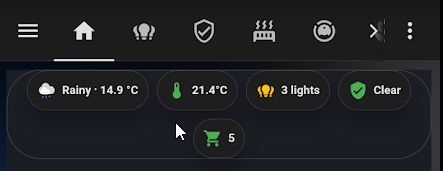
That alone solved the two-app problem. But the default view shows only item names — no store, no price, no date. With fifteen items from four different stores, the list isn't useful when you're in a hurry.
Modifying todo.py: description and sort order
The integration stores all item data from the eTilbudsavis API in the coordinator — including business.name (store), offer.price, and offer.validUntil. By default todo.py only puts the store name in the description field. To get price and date in there, I added two helper functions and changed the sort key.
The description builder:
def _build_description(store: str, offer: dict | None, now: datetime) -> str | None:
    if not store:
        return None
    offer = offer or {}
    price = offer.get("price")
    valid_until_str = offer.get("validUntil")
    desc = store
    if price is not None:
        price_str = f"{price:.2f}".replace(".", ",")
        desc += f" - {price_str} kr."
    if valid_until_str:
        try:
            valid_until = datetime.fromisoformat(valid_until_str.replace("Z", "+00:00"))
            if (valid_until - now).total_seconds() > 0:
                desc += f" til {valid_until.day}/{valid_until.month}"
        except ValueError:
            pass
    return desc
Both price and validUntil use .get() — if the API doesn't return them for shopping list items, they're simply skipped. The result is always valid: at minimum just the store name.
There's a second helper for expired offers. If validUntil is in the past, the item's summary gets a prefix so it stands out:
def _expiry_prefix(offer: dict | None, now: datetime) -> str:
    if not offer:
        return ""
    valid_until_str = offer.get("validUntil")
    if not valid_until_str:
        return ""
    try:
        valid_until = datetime.fromisoformat(valid_until_str.replace("Z", "+00:00"))
    except ValueError:
        return ""
    if (valid_until - now).days < 0:
        return "UDLOBET!!! "
    return ""
In the todo_items property, both functions are called per item, and the sort key gets the extra store dimension:
store = (item.get("business") or {}).get("name") or ""
prefix = _expiry_prefix(item.get("offer"), now)
summary = f"{prefix}{count}x {name}"
description = _build_description(store, item.get("offer"), now)

result.append((store, TodoItem(...)))

result.sort(key=lambda x: (
    x[1].status == TodoItemStatus.COMPLETED,
    x[0].lower(),   # store — groups items together
    x[1].summary.lower(),
))
The result: incomplete items before complete, then alphabetical by store, then alphabetical within a store. All Netto items together, then ABC Lavpris, then Bilka.
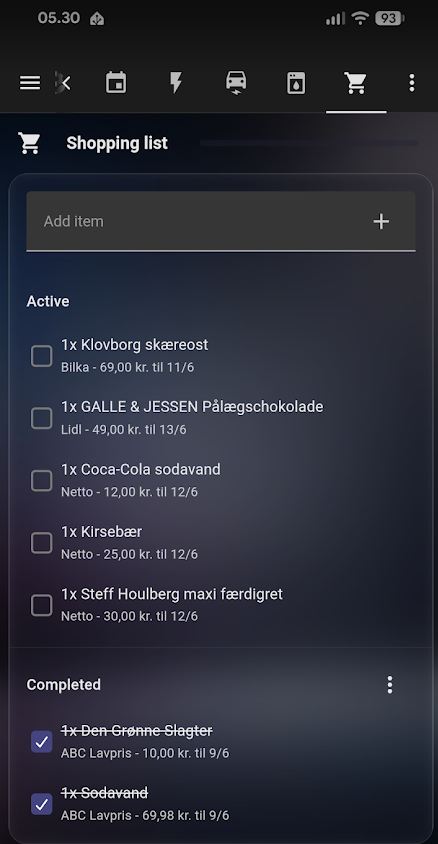
Two things worth knowing before you edit the file. First, todo.py lives at /config/custom_components/etilbudsavis/todo.py on your HA machine — HACS updates will overwrite it. The changes are small enough that reapplying them takes a few minutes. Second, after editing any Python file in a custom component, a full HA restart is required. reload_config_entry doesn't flush Python's module cache — only a restart does.
Zones and proximity notifications
This is the part from the Facebook post. Home Assistant has a zone entity type — you place a circle around a location and the companion app on your phone tracks when you enter or leave it. I created zones for each store I actually shop at: Min Kobmand, ABC Lavpris, Bilka, Lidl, Føtex, and two Netto locations.
An automation triggers when either my Pixel 10 or my wife's Pixel 9a enters any of those zones:
trigger:
  - platform: zone
    entity_id:
      - device_tracker.pixel_10
      - device_tracker.pixel_9a
    zone: zone.bilka
    event: enter
  # ... repeated for each store zone
The automation maps each zone entity to a store name in a variables block. Two Netto locations point to the same name — they produce the same notification either way:
variables:
  butik_lookup:
    zone.min_kobmand: "Min Kobmand"
    zone.abc_lavpris: "ABC Lavpris"
    zone.bilka: "Bilka"
    zone.lidl_vejlevej: "Lidl"
    zone.lidl_mosevej: "Lidl"
    zone.fotex: "Føtex"
    zone.netto_hylkedalvej: "Netto"
    zone.netto_stadionvej: "Netto"
  butik_navn: "{{ butik_lookup[trigger.zone] | default('') }}"
The action then calls todo.get_items, filters items whose description starts with the store name, and sends a push if any match:
- target:
    entity_id: todo.min_indkobsliste
  data:
    status: needs_action
  response_variable: todo_svar
  action: todo.get_items
- variables:
    varer: >
      {% set alle = todo_svar['todo.min_indkobsliste']['items'] | default([]) %}
      {% set ns = namespace(liste=[]) %}
      {% for vare in alle %}
        {% if vare.description | default('') | regex_match(butik_navn) %}
          {% set ns.liste = ns.liste + [vare.summary] %}
        {% endif %}
      {% endfor %}
      {{ ns.liste }}
- condition: template
  value_template: "{{ varer | count > 0 }}"
- data:
    title: "🛒 {{ butik_navn }} – {{ varer | count }} item(s) on the list"
    message: "{{ varer | join('\n') }}"
  action: notify.alle_enheder
regex_match matches from the start of the string, so "Netto" matches "Netto – 12,95 kr. · til 12/6" without needing a contains check. Replace notify.alle_enheder with your own notify service — that's just the group I use to reach both phones at once.
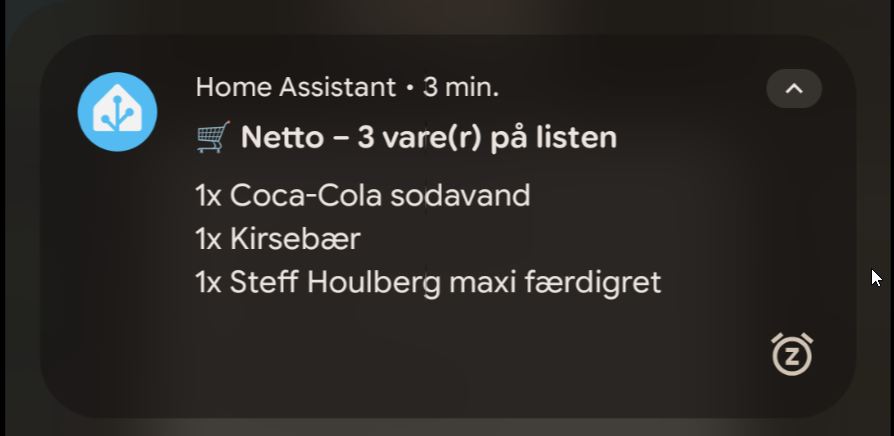
The first time it fired I was walking into Bilka. Phone buzzed — two items on the list. I already knew that. I'd written the list myself. But having it appear on the screen at the exact moment I walked through the door is a different thing than remembering to open an app.
New posts in your feed reader: follow with RSS In Google Search: add szimnau.dk as a preferred source