A Detections-Only Event List for Home Assistant Cameras
The logbook card shows both Detected and Cleared for camera sensors. The fix: an input_text rolling log, an automation with trigger IDs, and a markdown card.
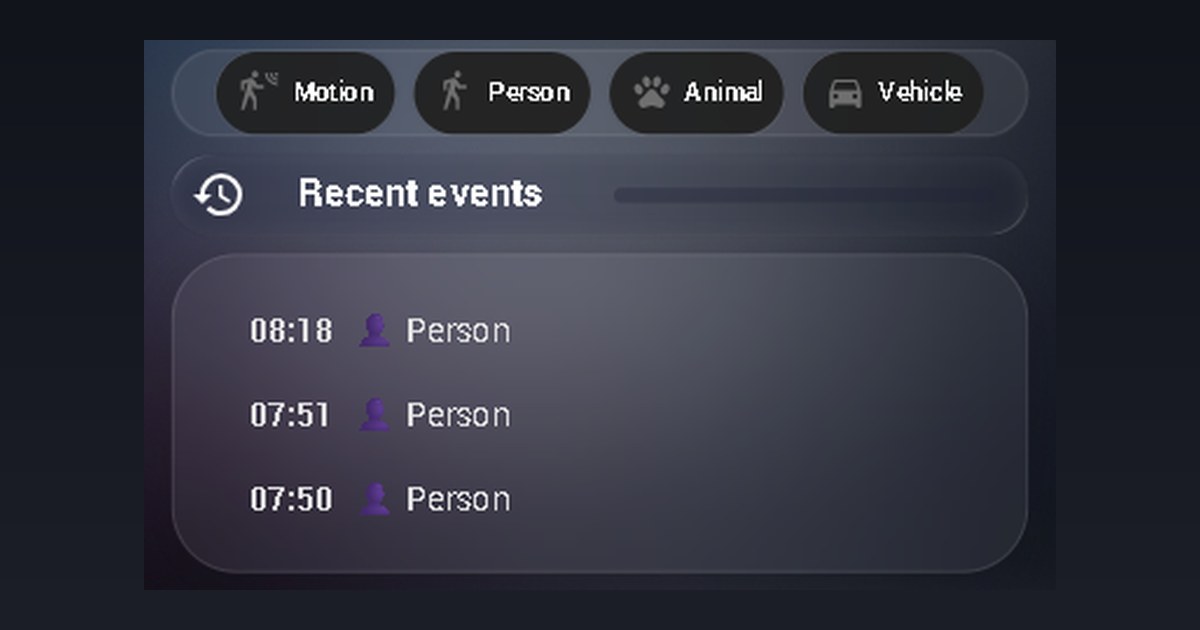
My security view in Home Assistant has a "Recent events" list below the camera feed — driven by the four binary sensors my AI camera exposes: person, motion, animal and vehicle. The problem: the logbook card shows every state transition. Each "Person Detected" is followed by a "Person Cleared" thirty seconds later, so half the list is noise and the history covers half the time span it could.
And no — the logbook card cannot filter by state. It takes an entity list and a time window. That's it.
The options, and why I rejected them
A trigger-based template sensor with a list attribute is the "proper" solution — but it can't be created from the UI and requires YAML in configuration.yaml. A todo list as an event log works, but renders clumsily and needs a second automation to prune it. I wanted something that could be built entirely through the UI/API in five minutes and survive restarts.
The fix: input_text as a rolling log
An input_text helper is persistent, UI-friendly and writable from an automation. The 255-character cap is real — but with an HH:MM label format and a separator that's roughly the 10 most recent events. For a "Recent events" list, that's exactly enough.
The automation triggers only on on — it never touches "Cleared":
alias: Sentinel event log
mode: queued
triggers:
  - trigger: state
    entity_id: binary_sensor.sentinel_person
    to: "on"
    id: person
  - trigger: state
    entity_id: binary_sensor.sentinel_motion
    to: "on"
    id: motion
  - trigger: state
    entity_id: binary_sensor.sentinel_animal
    to: "on"
    id: animal
  - trigger: state
    entity_id: binary_sensor.sentinel_vehicle
    to: "on"
    id: vehicle
actions:
  - action: input_text.set_value
    target:
      entity_id: input_text.sentinel_event_log
    data:
      value: >-
        {% set m = {'person':'👤 Person','motion':'🏃 Motion',
                    'animal':'🐾 Animal','vehicle':'🚗 Vehicle'} %}
        {% set new = now().strftime('%H:%M') ~ ' ' ~ m[trigger.id] %}
        {% set old = states('input_text.sentinel_event_log') %}
        {% set items = ([new] + (old.split(' · ')
           if old not in ['unknown','unavailable',''] else []))[:10] %}
        {{ (items | join(' · '))[:255] }}
Three details carry the whole thing: trigger IDs double as labels through the lookup map, so one action handles all four sensors. mode: queued makes sure two detections in quick succession don't overwrite each other. And the [:10] trim happens at the event level before joining, so an entry is never cut in half.
The markdown card
The card splits the log and renders one line per event, timestamp in bold:
type: markdown
content: >-
  {% set raw = states('input_text.sentinel_event_log') %}
  {% if raw in ['unknown','unavailable',''] %}*No detections logged yet*
  {% else %}{% for e in raw.split(' · ') if e %}**{{ e[:5] }}**  {{ e[6:] }}

  {% endfor %}{% endif %}
The result is the list in the hero image: detections only, twice the history in the same space, zero "Cleared" lines. It sits in the same glass container style as the rest of the view — the ANPR/license-plate version of this camera setup uses the same visual recipe.
The limitations, honestly
255 characters is about 10 events, and there's only a time — no date. Once an event rolls off the log it's gone (the full history still lives in the logbook/recorder). If you need longer history with dates, a trigger-based template sensor with a list attribute is the right tool — the price is YAML configuration and a restart. The same "small helper + automation" pattern shows up all over my context-aware home screen, and it has yet to let me down.
New posts in your feed reader: follow with RSS In Google Search: add szimnau.dk as a preferred source