Pausing the TV Automatically for Regular Calls and Messenger
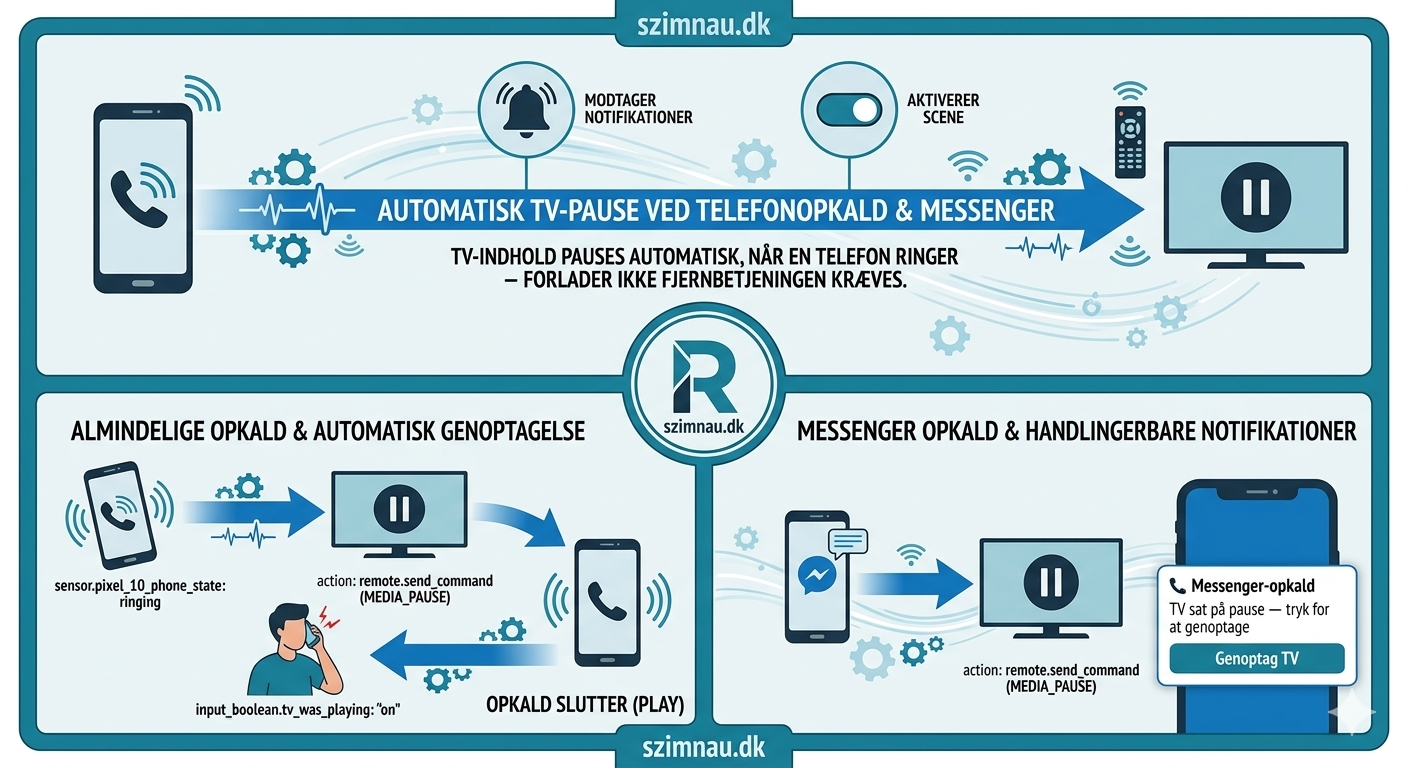
One automation pauses the TV the moment either phone rings. Regular calls resume automatically, Messenger video calls get a notification button.
Update, October 2026: Regular calls still pause the TV as described. The Messenger part is not running in my setup right now: the last_notification sensor is disabled in Home Assistant, and it needs the Companion app to have access to the phone's notifications. The automation below is unchanged, but that part of it only fires again once the sensor is enabled.
The problem is obvious once you've experienced it enough times. Someone calls. You scramble for the remote. You find it under a cushion. You pause the film. You've already missed the first sentence of the conversation.
The automation is one condition: if a phone rings and the TV is on, pause it. When the call ends, resume it.
The phone sensor
The HA Companion App (free, Google Play / App Store) exposes sensor.pixel_10_phone_state with four states: ringing, in_call, offhook, idle. Install the app, sign in to your HA instance, and the sensor appears automatically — no extra configuration. The trigger covers all three non-idle states — you want the TV to pause the moment the phone rings, not after you've answered.
The TV remote entity (remote.tv_stuen) comes from the Android TV integration — built into HA, add it under Integrations and point it at your TV's IP. The automation first checks whether the TV remote is actually on. There's no point sending a pause command to a TV that's already off or was already paused. input_boolean.tv_was_playing handles the latter — it's set to on when the automation pauses and checked before resuming. Without it, a call could restart something that was intentionally paused before the call came in.
alias: TV — Pause on phone call
trigger:
  - platform: state
    entity_id: sensor.pixel_10_phone_state
    to: [ringing, in_call, offhook]
    id: phone
condition:
  - condition: state
    entity_id: remote.tv_stuen
    state: "on"
  - condition: state
    entity_id: input_boolean.tv_was_playing
    state: "off"
action:
  - action: input_boolean.turn_on
    target:
      entity_id: input_boolean.tv_was_playing
  - action: remote.send_command
    target:
      entity_id: remote.tv_stuen
    data:
      command: MEDIA_PAUSE
  - wait_for_trigger:
      - platform: state
        entity_id: sensor.pixel_10_phone_state
        to: idle
    timeout: "02:00:00"
    continue_on_timeout: true
  - delay:
      seconds: 2
  - condition: state
    entity_id: input_boolean.tv_was_playing
    state: "on"
  - action: remote.send_command
    target:
      entity_id: remote.tv_stuen
    data:
      command: MEDIA_PLAY
  - action: input_boolean.turn_off
    target:
      entity_id: input_boolean.tv_was_playing
The 2-second delay before resuming is intentional. Without it the play command fires while the call is still technically ending — the phone sensor hits idle a fraction of a second before the call actually drops, and the audio comes back mid-goodbye.
The 2-hour timeout is a safety net. If a call somehow doesn't register as ended, the automation doesn't sit waiting forever. continue_on_timeout: true means it resumes regardless after two hours.
Messenger is different
Messenger video calls don't register in phone_state. They come through as a notification. The companion app exposes sensor.pixel_10_last_notification, and when the state contains "opkald" (call), it's a Messenger call.
The handling is different because the end of a Messenger call is less reliable to detect. Instead of waiting for the sensor to go idle, it sends an actionable notification with a single button: Resume TV. Tapping it fires the resume immediately. If nobody taps within 30 minutes, the automation continues anyway.
  - choose:
      - conditions:
          - condition: template
            value_template: >
              {{ 'opkald' in (trigger.to_state.state | lower) }}
        sequence:
          - action: remote.send_command
            target:
              entity_id: remote.tv_stuen
            data:
              command: MEDIA_PAUSE
          - action: notify.alle_enheder
            data:
              title: "📞 Messenger call"
              message: "TV paused — tap to resume"
              data:
                actions:
                  - action: tv_resume_after_call
                    title: Resume TV
          - wait_for_trigger:
              - platform: event
                event_type: mobile_app_notification_action
                event_data:
                  action: tv_resume_after_call
              - platform: state
                entity_id: sensor.pixel_10_phone_state
                to: idle
            timeout: "00:30:00"
            continue_on_timeout: true
          - action: remote.send_command
            target:
              entity_id: remote.tv_stuen
            data:
              command: MEDIA_PLAY
The 30-minute timeout on Messenger versus 2 hours on regular calls reflects reality — Messenger video calls rarely last more than half an hour. A regular phone call to a parent might go for an hour and a half.
What this actually solves
The scramble for the remote. That's it. It sounds small. After a few weeks of not having to do it, you notice how often it used to happen — and how the first thing you did when the call ended was find the remote and un-pause, which is not what you want to be thinking about.
The automation runs silently. There's no "TV paused" banner unless it's a Messenger call that needs the manual resume button. Regular calls: it pauses, you talk, it resumes. Nothing to confirm, nothing to tap.
New posts in your feed reader: follow with RSS In Google Search: add szimnau.dk as a preferred source