Christmas Lights on a Sunset Schedule in Home Assistant
How my garden Christmas lights follow the sun: on at sunset +15 min, off at 23:00 and sunrise, only November to January, plus a power-cut fix.
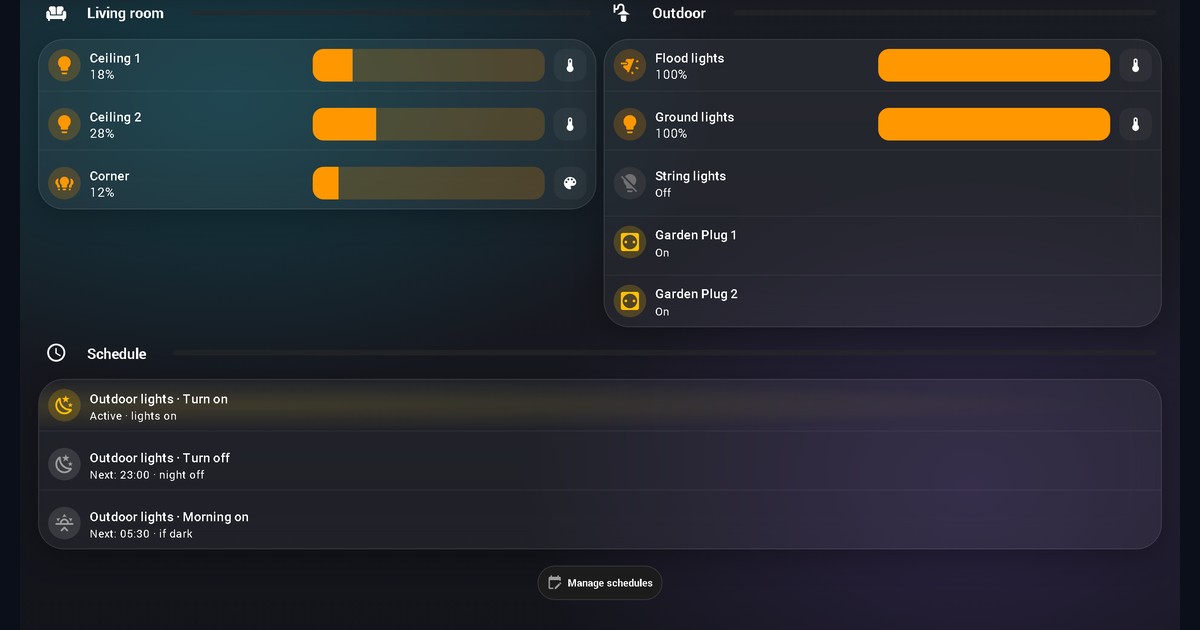
Update, November 2026: The Govee and LEDVANCE lights and the two automations from the first version are gone. The outdoor lights are now Christmas lights on three Scheduler schedules that only run from November to January, plus an automation that switches a light back on after a power cut. I rewrote the post to match, with a new screenshot of the dashboard.
Christmas lights that come on in June would look silly, and the first version of this post would have done exactly that. It ran two automations every day of the year, with a fixed switch-off at midnight. When the outdoor lights turned into Christmas lights, the setup needed a different shape.
What runs now
Flood lights, ground lights and a string of lights sit in one light group, light.udendors_lys (udendørs is Danish for outdoors). Two Matter plugs, switch.garden_plug_1 and switch.garden_plug_2, sit next to it. Three schedules in the HACS component Scheduler control the group and both plugs:
| Schedule | When | Only if | What it does |
|---|---|---|---|
| Turn on | sunset +15 min | season is on | group at brightness 255, both plugs on |
| Turn off | 23:00, and again at sunrise | season is on | group and both plugs off |
| Morning on | 05:30 | season is on and the sun is below the horizon | same as turn on |
The sun picks the evening
The turn-on time is sunset+00:15:00. Scheduler writes the sun offset straight into the time, so there is no trigger to build. Today it resolves to 16:44. In mid-December it will be around 15:55. I keep the 15 minutes because the sky is still bright at the moment the sun technically sets, and Christmas lights disappear in that.
Off is a fixed 23:00. The morning run needs an end too, so there is a second turn-off at sunrise, which is 07:42 tomorrow.
Why 05:30 only if it's dark
From November to January it is always dark at 05:30 here, because sunrise never comes before about 07:00. The check sun.sun is below_horizon never fails today. I added it anyway. If I move the time or stretch the season into March, the lights can't come on in daylight, which is the exact flaw I started this whole thing with.
The season sensor
binary_sensor.julelys_saeson is a template helper with one line:
{{ now().month in [11, 12, 1] }}It is a month check, nothing cleverer. All three schedules have it as a condition, so outside the season nothing runs. That works in both directions. The lights stay off in July, and if I switch the garden plugs on by hand for a summer evening, nothing turns them off at 23:00.
When the power goes
A light that loses power can come back switched off, and a schedule that already fired won't try again until its next time slot. So there is one small automation, automation.outdoor_lights_turn_on_after_power_restore. It triggers when any light in the group goes from unavailable to on or off and stays there for 15 seconds, so it has settled before the command arrives. Then it turns that light on at 255, if one of two windows is open:
- after sunset +15 min and before 23:00
- after 05:30 and before 12:00, with the sun below the horizon
The mode is parallel, so two lights that return together both get handled. It last ran on 6 November at 17:54, about an hour after the evening schedule had already fired. A light had come back late, and nobody had to touch it.
It also checks the season sensor, so in February a light that comes back from a power cut stays as it is, because no schedule is running. I added that condition on 8 November after I noticed the gap while writing this post.
Why Scheduler and not an automation
I can change a time on a card in the dashboard instead of editing YAML, and the next trigger is an attribute on each schedule switch, so the dashboard can show it without calculating anything.
An automation would do the same job. It also keeps traces, which Scheduler doesn't, so when a schedule doesn't fire I have fewer clues. Scheduler's conditions are simple "entity is value" checks, and the schedules live in Home Assistant's storage instead of a YAML file I can diff. It is also a custom component. If you are comfortable in YAML, the two automations from the first version still work.
The dashboard
Each schedule is a Mushroom template card that reads next_trigger from its switch. The text on the first row comes from this template:
{% set nt = state_attr('switch.schedule_afaff2', 'next_trigger') %}
{% if is_state('switch.schedule_afaff2', 'off') %}Disabled
{% elif is_state('binary_sensor.julelys_saeson', 'off') %}Out of season (Nov–Jan)
{% elif is_state('light.udendors_lys', 'on') %}Active · lights on
{% elif nt %}Next: {{ as_local(as_datetime(nt)).strftime('%H:%M') }} · sunset +15 min
{% else %}Disabled{% endif %}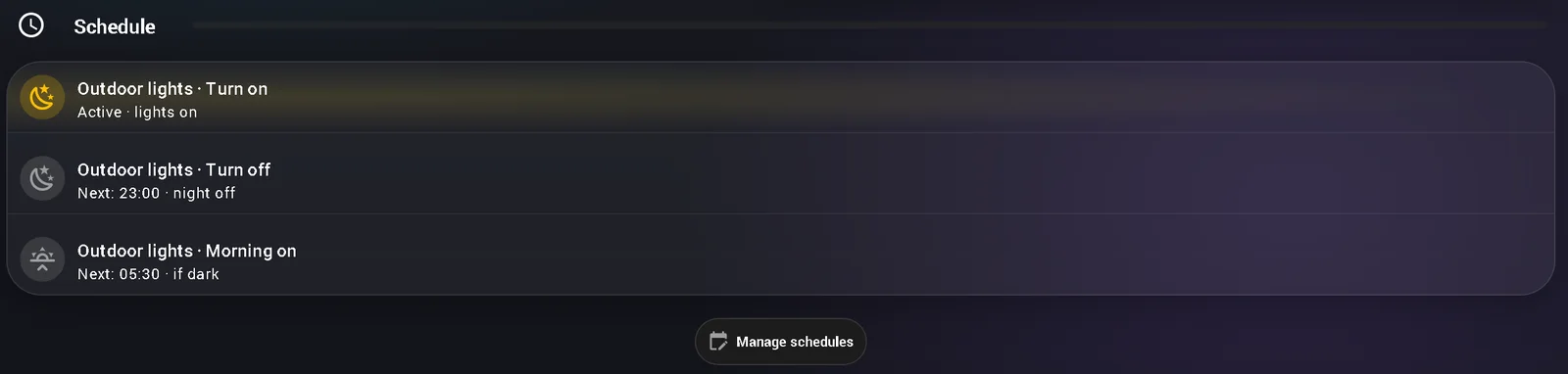
The "Manage schedules" button below the rows opens a pop-up with the Scheduler card, where the times can be edited.
One gotcha
I renamed the three schedules with scheduler.edit and a new name. The schedule switches vanished from Home Assistant. They only came back after scheduler.reload_storage, and they came back switched off. The order that works: edit, reload storage, switch them on again, check that all three are on.
New posts in your feed reader: follow with RSS In Google Search: add szimnau.dk as a preferred source