Škoda Elroq and Home Assistant, Six Months Later
From MyŠkoda to VW Group Connect in Home Assistant: what the integration gives you, what is missing, and an EV dashboard with battery status and pre-heating.
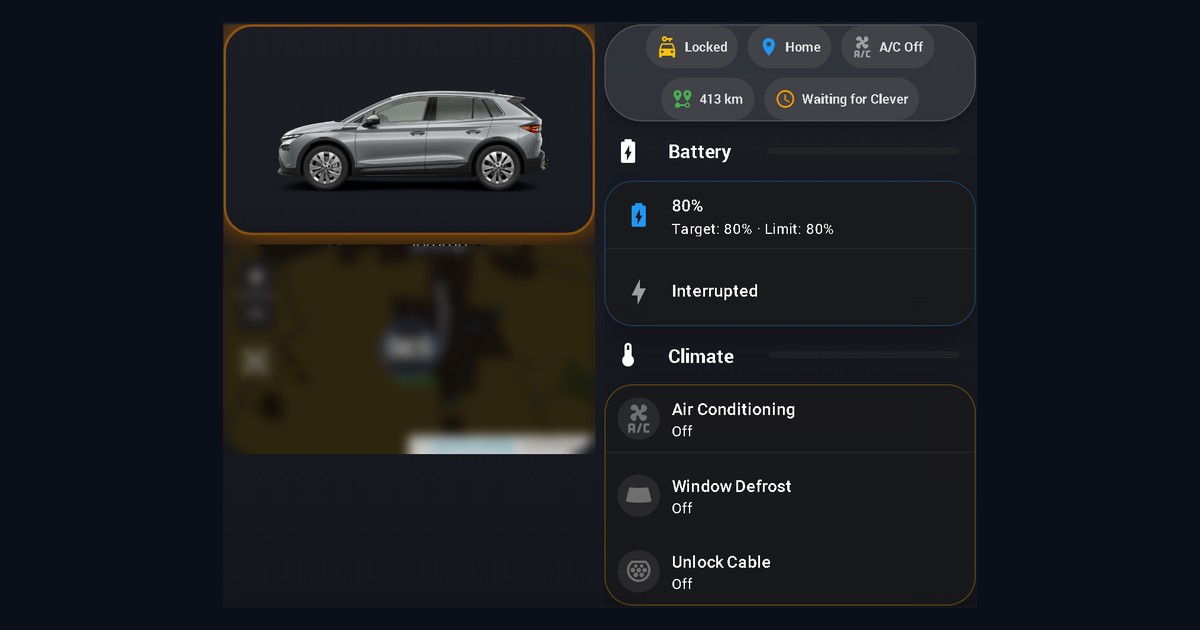
API restrictions — May 2026
VW Group has introduced app attestation requirements, gradually restricting third-party access. The integration partially works, but not fully:
- Reading data (battery, range, charge status) — still works via polling
- Real-time commands (pre-conditioning, start/stop charging) — broken since ~7 May via MQTT
- Push updates from the car — broken
Automations that rely on commands — such as calendar-triggered pre-conditioning — are unreliable. VW has stated that apps without a formal agreement with VW Group Info Services will lose access going forward. The EU Data Act (12 Sept. 2026) may change this legally.
See GitHub issues for the latest status.
Update, September 2026 — end of life announced
Škoda has announced that MySkoda will stop working entirely in October 2026, once the backend it depends on is retired. An official Home Assistant integration is "expected" with the 2026.10 release, but that date isn't confirmed.
I've now moved my own Elroq automations to VW Group Connect, a maintained alternative that already supports Škoda over several channels. If you're still on MySkoda, get VW Group Connect authenticated now rather than waiting for the cutover — the two run side by side fine. Don't expect a drop-in rename, though: entity names differ (garage_<car_name>_*, not skoda_elroq_*), and at least one enum sensor changes case entirely — MySkoda's charging_state is lowercase (ready_for_charging), VW Group Connect's equivalent is uppercase (READY_FOR_CHARGING). Check every automation's state comparisons by hand; don't assume parity.
October 2026: the switch is done
MySkoda is now completely gone from my dashboards and automations. Three things surprised me along the way.
Cable unlock was already gone. When I checked, MySkoda offered a single service, set_preferred_charging_time. The unlock_charger_cable service my script called no longer existed, so the script had been failing silently. VW Group Connect has no direct command for it, but it exposes the setting auto_unlock_charging_plug, which releases the plug when the car unlocks. My script now turns that on and unlocks the car. I have not tested it at the car yet.
Battery care is the real limit. The charge target said 100 %, but the graph topped out at 80 %. The car's battery care mode, which VW Group Connect exposes as a switch, is what decides. If you want 100 % before a trip, turn off battery care, not the charge target.
A parked car sleeps. My stale-data warning fired after 45 minutes without a report, so it was on almost every time the car was parked. Now it only warns when the integration itself reports stale data, the car is unreachable, 45 minutes pass while driving, or a full day passes without any report.
What VW Group Connect gives you that MySkoda did not
- Trip data: last trip distance, duration and average consumption, plus the odometer.
- Tyre pressure, engine and brake warnings as binary sensors.
- The parking address as text.
- Switches for battery care, charging and automatic charging plug release.
- Services for seat heating, window heating and charge target.
What I built on top (testing in October)
- Charge to 100 % before long trips. At 19:00 Home Assistant reads tomorrow's calendar. If an event has an address outside my local area, battery care is turned off, and it comes back on once the car has been home for 30 minutes. My electricity provider's smart charging still decides when the car charges.
- Cost per trip. When the odometer has been still for 10 minutes, the distance, kWh and a cost estimate at the current electricity price are logged. The dashboard shows this month's kilometres and kroner.
- Pre-heating before morning appointments below 5 °C, with window heating below 1 °C and seat heating below −2 °C.
- A notification if the car is left unlocked for 10 minutes away from home, with the address and a Lock now button.
I will update this post once they have run for a month.
The My Škoda app is fine. It does everything it's supposed to do. But it's one more app that knows something my Home Assistant doesn't, and that bothered me more than it probably should.
The MySkoda integration (HACS) fixes that. It authenticates with your Škoda Connect account and polls the cloud API. The polling latency is real — commands take 15–60 seconds to reflect — but for most use cases that's fine.
What the MySkoda integration gives you in Home Assistant
After setup, the Elroq shows up as a device with:
sensor.skoda_elroq_battery_percentage  — state of charge (%)
sensor.skoda_elroq_charging_power      — current charge rate (kW)
sensor.skoda_elroq_range               — estimated range (km)
number.skoda_elroq_charge_limit          — charge limit set in car (%)
binary_sensor.skoda_elroq_charger_connected
sensor.skoda_elroq_charging_state
binary_sensor.skoda_elroq_doors_locked
climate.skoda_elroq_air_conditioning   — remote HVAC
switch.skoda_elroq_charging            — start/stop
The climate entity is the one I use most. Set it to a temperature, call climate.turn_on, and the car starts heating or cooling from whatever power source it's connected to. If it's plugged in, it draws from the grid. If not, from the battery — which is why I skip pre-conditioning if the battery is below 30%.
Building the EV dashboard card
I wanted the battery level visible at a glance without taking up much space. The solution is a green gradient behind the card content via ha-card::after — it fills the card proportionally to the charge level. The card uses custom:stack-in-card and custom:mushroom-template-card (both HACS, part of the Mushroom suite), with card_mod (HACS) for the CSS:
type: custom:stack-in-card
card_mod:
  style: |
    ha-card {
      background: rgba(255,255,255,0.05) !important;
      backdrop-filter: blur(15px) !important;
      border: 1px solid rgba(255,255,255,0.10) !important;
      box-shadow: 0 8px 32px rgba(0,0,0,0.3) !important;
      border-radius: 28px !important;
      overflow: hidden !important;
      position: relative !important;
    }
    ha-card::before { display: none !important; }
    ha-card::after {
      content: '' !important;
      position: absolute !important;
      left: 0; top: 0;
      width: {{ states('sensor.skoda_elroq_battery_percentage') | int(0) }}% !important;
      height: 100% !important;
      background: linear-gradient(90deg, rgba(76,175,80,0.18), rgba(129,199,132,0.05)) !important;
      pointer-events: none !important;
    }
cards:
  - type: custom:mushroom-template-card
    primary: "{{ states('sensor.skoda_elroq_battery_percentage') }}%  ·  {{ states('sensor.skoda_elroq_range') }} km"
    secondary: Škoda Elroq
    icon: mdi:car-electric
    icon_color: >
      {% set soc = states('sensor.skoda_elroq_battery_percentage') | int(0) %}
      {% if soc > 60 %}green{% elif soc > 30 %}orange{% else %}red{% endif %}
The gradient is subtle — you don't really notice it as a progress bar, it just makes the card feel different at 20% versus 80%. Took a few iterations to get the opacity right so it reads as information without dominating the card.
The car icon gets one more layer when sensor.skoda_elroq_charging_state is charging: a glowing ring that cycles through cyan and green — the same colors as the LED ring on the Elroq's front bumper while it charges. Add a card_mod block directly on the mushroom card inside the stack:
    card_mod:
      style: |
        mushroom-shape-icon {
          {% if is_state('sensor.skoda_elroq_charging_state', 'charging') %}
          animation: charge-ring 2s linear infinite;
          {% endif %}
        }
        @keyframes charge-ring {
          0%   { box-shadow: 0 0 8px 3px rgba(0,212,255,0.85); }
          33%  { box-shadow: 0 0 8px 3px rgba(0,255,140,0.85); }
          66%  { box-shadow: 0 0 8px 3px rgba(100,220,255,0.85); }
          100% { box-shadow: 0 0 8px 3px rgba(0,212,255,0.85); }
        }
The Jinja in the CSS is evaluated server-side, so the animation only exists in the DOM when the car is actually charging. When it's off, the selector has no properties at all.
Pre-conditioning from Google Calendar
I have a recurring calendar event called "Drive to office" with a fixed start time. The automation fires 30 minutes before:
alias: Elroq — Pre-condition for calendar
trigger:
  - platform: calendar
    event: start
    offset: "-0:30:0"
    entity_id: calendar.personal
condition:
  - condition: template
    value_template: "{{ 'Drive to office' in trigger.calendar_event.summary }}"
  - condition: numeric_state
    entity_id: sensor.skoda_elroq_battery_percentage
    above: 30
action:
  - service: climate.turn_on
    target:
      entity_id: climate.skoda_elroq_air_conditioning
  - service: climate.set_temperature
    target:
      entity_id: climate.skoda_elroq_air_conditioning
    data:
      temperature: 21
This works well in winter. In practice it means the car is warm when I leave — genuinely pleasant on cold mornings — and the battery hit is small enough to not matter.
One problem: the calendar trigger fires based on the event summary matching exactly. If I rename the event or add something to the title, the condition fails silently and the car doesn't pre-condition. I've had that happen twice. It's a fragile string match and I haven't found a better approach yet.
Charging cable alert automation
Forgetting to plug in is the one failure mode that actually costs something. The car sits overnight, draws nothing from the grid, and you leave in the morning with whatever charge you had the day before.
The AlertTicker card handles this. Between 21:00 and 06:00, if binary_sensor.skoda_elroq_charger_connected is off, a warning banner appears across every dashboard view:
type: custom:alert-ticker-card
alerts:
  - entity: binary_sensor.skoda_elroq_charger_connected
    state: "off"
    message: "Elroq is not plugged in"
    theme: warning
    priority: 1
    time_from: "21:00"
    time_to: "06:00"
The time window matters — during the day it's off the charger constantly. The alert is only relevant at night when it should be charging. Outside that window it's silent regardless of plug state.
For automating when to charge based on hourly spot prices, I've written a full guide for Danish EV owners.
What the MySkoda integration still lacks
The integration doesn't expose charging session data — no kWh added in the current session, no charge history. You can see the current power draw but not how long it's been running or how much it's added. For smart charging automation this is fine; for monitoring your actual charging costs it's a gap.
Door and window state is aggregate. You know if any door is unlocked, but not which one. Useful for "did I lock the car" but useless for "which window did I leave open."
For the latency problem specifically: if you're standing next to the car and pressing "start charge" in the HA dashboard, expect to wait a minute before the switch state updates. It's cloud-round-trip latency and there's nothing to be done about it. Use the app for anything interactive.
Tracking battery and range over time
After a while, the data I actually wanted wasn't the current state — it was the trend. Is the battery draining overnight? How does range change as the temperature drops?
custom:apexcharts-card (HACS) answers both. Battery percentage over 5 days — charging sessions show up as sharp upward spikes, overnight drain as gentle slopes:
type: custom:apexcharts-card
graph_span: 5d
header:
  show: true
  title: Battery
  show_states: true
  colorize_states: true
apex_config:
  chart:
    background: transparent
    toolbar:
      show: false
  theme:
    mode: dark
  yaxis:
    min: 0
    max: 100
series:
  - entity: sensor.skoda_elroq_battery_percentage
    name: Battery %
    color: "#4CAF50"
    stroke_width: 2
    fill_raw: last
    type: line
    unit: "%"
Range and outside temperature on a dual-axis chart. The two lines move nearly independently in summer. It's a winter story: on the MEB platform, expect 20–30% range reduction below freezing:
type: custom:apexcharts-card
graph_span: 5d
header:
  show: true
  title: Range & Temperature
  show_states: true
  colorize_states: true
yaxis:
  - id: range_axis
    min: 0
    max: 600
    apex_config:
      title:
        text: km
  - id: temp_axis
    opposite: true
    min: -10
    max: 40
    apex_config:
      title:
        text: °C
apex_config:
  chart:
    background: transparent
    toolbar:
      show: false
  theme:
    mode: dark
series:
  - entity: sensor.skoda_elroq_range
    name: Range (km)
    yaxis_id: range_axis
    color: "#2196F3"
    stroke_width: 2
    fill_raw: last
    unit: km
  - entity: sensor.skoda_elroq_outside_temperature
    name: Temp (°C)
    yaxis_id: temp_axis
    color: "#FF9800"
    stroke_width: 2
    fill_raw: last
    unit: °C
One thing to watch: the MySkoda integration creates 56 entities. Recording all of them adds up fast — window states, door states, software version, inspection dates. Most change rarely and have no graphing value. Exclude the bulk and keep only what you want to track historically:
recorder:
  exclude:
    entity_globs:
      - sensor.skoda_elroq_*
  include:
    entities:
      - sensor.skoda_elroq_battery_percentage
      - sensor.skoda_elroq_range
      - sensor.skoda_elroq_outside_temperature
      - sensor.skoda_elroq_charging_state
My HA instance runs on Proxmox VE on a Dell OptiPlex 7060, where snapshot-before-update is a one-click habit — worth reading if you're still on a Pi and wondering whether the move is worth it.
New posts in your feed reader: follow with RSS In Google Search: add szimnau.dk as a preferred source